Showing posts with label Tricks. Show all posts

27 Sept 2014

How Do You Manage, Delete Passwords in Google Chrome?

Manage Your Password in Google chrome to avoid entering login information repeatedly.

Chrome lock

Many Internet users configure their browsers to remember passwords to avoid entering login information repeatedly. Google’s Chrome features a built-in password manager that allows you to save credentials for all of your favorite websites. While this can be convenient, the passwords are often stored as plain text in the web browser. This means anyone can see your passwords with just a few clicks. The following tutorial will show you how to do manage your password in Google Chrome.

1. First Open Google Chrome browser If not you have Google Chrome Browser Download From Below Link.


2. Then go to menu icon at the top right corner of the screen click on it to expand the menu.

coner tab

3. From the menu, Select Settings.

delete password

4. In the Settings page, go down to the bottom and click on Show advanced settings

Advance Setting

5. Find the Passwords and forms section, and click on “Manage passwords”

Manage Password

6. A new window will pop up on screen which displays the list of websites that currently have passwords stored in the browser. Find the website and the password that you want to delete, just click on the “X” button.

show pass


7. In case you forget the passwords of your accounts, you can also use this tool to reveal. Just click on the password box, and choose Show.

saved password in chrome

Once you have finished the task, just click Done, and close the window.


8 Sept 2014

Create your own WiFi hotspot without the software (for PC)

Create your own Wifi howspot yourself to used CMD for internet share with your friends and family.

free zone hotspot

How are you all? Today I will share a trick that you can share your WiFi network from your laptop without any kind of software. A lot of time We share the net from the PC to use the WI-Fi. For this We use various software for creating WI-Fi zone. But Software has a various problem such as limited version, buy now, bug, version support, etc. Today I'll show you how to create the WI-Fi hotspot without software.

sharing with people

First, Open CMD (command prompt) Run as Administrator. Open Will a new window. Write a command “netsh wlan show drivers” (without “”) for the First time. Press Enter.

To search from there Hosted network support. If “yes”, it allows you to create a Wi-Fi. Or show “no” you can’t create wi-fi.

tutorial hotspot

Then type “ netsh wlan set hostednetwork mode=allow ssid=your net name (after ssid=no need space) key =your password (To use password on Wi- Fi)” to set network name & Password.

For an Example: netsh wlan set hostednetwork mode=allow ssid=onnoshob key=1bhk678
Press enter

tutorial hotspot 2

Your main work finished.

Now write start command: “netsh wlan start hostednetwork” press enter and Done close it.

tutorial hotspot 3


After connecting If your WI-Fi network showed limited then you have to go your main network properties. Go control panel > Network & sharing center > main network connected > properties > Sharing > select both (2) box and select your wi-fi created a connection from select a private network connection.

Also You can Use free net of cell operators. Keep sharing with your Family + Friends Enjoy

If you did't get it properly, You can see Video tutorial.


1 Sept 2014

Use 3G speed GP Free net On PC Latest

I come back again with GP free Net posts, Today I will share with you how to use 3G Unlimited internet with download speed and browsing on the computer with only 2tk+vat for 30 days.
Start working with the step by step.

3G speed

First Step Internet packages configuration:

1 .Dial into your mobile handset *500*0# To going to pay - per - use package.

2. After Receive Confirmation messages again dial *500*80# (you have to pay 2tk+30 paise VAT) valid for the whole month will 4MB data.

3. So you can turn off your package autorenewal Dial *500*42#

Second Step modem configuration:

1. The modem connects & Open your modem Software

2. Go to Tools > Options > Profile Management > new

GP Modem Free net configeration

3. The modem Connect with GP Wap profile

Third Step Free Net Server configuration:

 1. From Here download the new effect Simple server.

GP Free net server

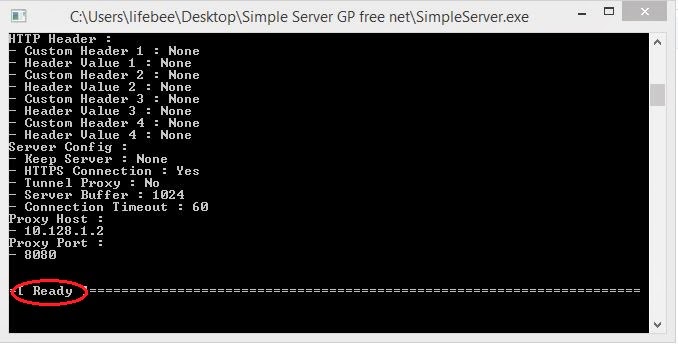
 2. After downloading the file , open it from the inside SimpleServer.exe .If want the password to open Give password: www.firoz.me .

 3. When Showed Ready after process then Enjoy

OR

If not work By using Third step then Try This net Server
1.       Download from here, Open program Folder press on XT181PP.exe (Red)

free net GP Free net server


2.       Press on Listen


3.       Then go second forder name refresher, keep open both pages


Fourth Step browser and IDM configuration:

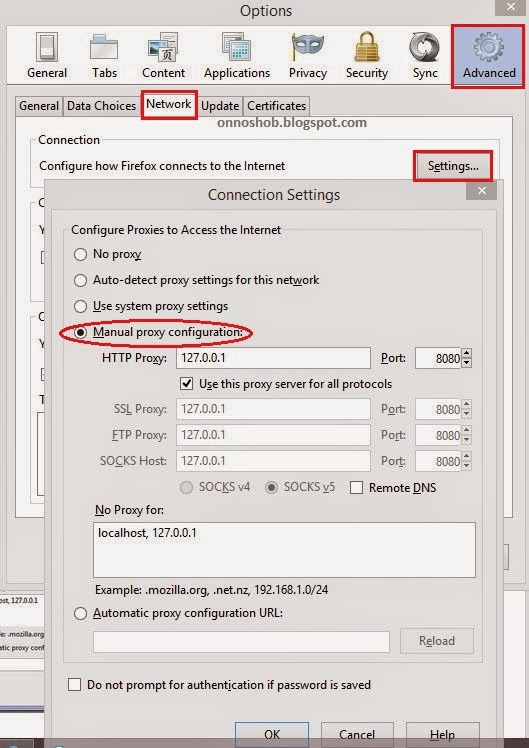
1. Open your browser go to the Tools > Options> Advanced> Network> Settings

 2. From here , select Manual Proxy Configuration box in the proxy HTTP Proxy 127.0.0.1 and Port
box set 8080.

GP Free net fire fox proxy

3. Use this proxy server for All protocol Mark then save.

4. IDM at Http, https proxy tick the box to let the same rules.

IDM proxy GP Free net

Now Your computer is ready to use free net. But your balance, and keep the data zero if not all will cut. If you want access https site you must use to a proxy site like: www.soloxy.com

Also try Banglaling Free Net


What should do if forget to Facebook logout ?

How are you all? Today I come back again with a very important security tips post. This post is the content of Facebook’s security. Those who do not know it, they should know that it is very important.

 Facebook logout

Much of time is that, you login with your Facebook Account at cyber café or other’s PC or friends Mobiles and that time electricity gone or forget to Face book logout from your Facebook Account. Your Facebook Account fall in huge danger. Now anyone can access your Facebook with those computers or mobile. Now what you do in this situation?
Here the Solution, Your can save your Facebook Account to Hack through Facebook Security system.

You have to do......
1 .Please first login to your Facebook Account from the PC or MOBILE.

2. Then Go to Account Setting

3. Then Security option and press on “Where You're Logged In”

4. There showed all login Activity & press on “End All Activity”

 Facebook logout

Now you and your Facebook Account save. After press on “End All Activity” all previous login activity will be logout.

Note: when you login in Facebook account with other mobile or computer never select on "Keep me login" and do not save passwords .


31 Aug 2014

Live Files share from one PC to another PC

Today I am going to introduces with the file sharing site. We need to do lot of files share with distant friends. But many of us don't know that we can very easily to share files only use the internet without open an account on a file sharing site. But Now What?

transfer one pc to another

First go to this site: justbeamit.com then Drag & Drop select the files. After few second will create a link and send it to a friend. Your friends can download the file using this Link. Like live one PC to Another PC.

Live Files transfer from one PC to another PC

Keep in Mind a word, Don’t shutdown your PC or disconnect your net connection until the file download is completed. Carry on files shared & Enjoy the Internet Suffering.


29 Aug 2014

Create more than one Facebook Accounts with Single Gmail ID

Gmail is a popular email service provider. We all love Gmail & use Gmail. Today I 'll share with you, A Simple but very effective tricks of Gmail. Through tricks , Your one of Gmail ID you can be used million - billion as ID.
gmail logo

Sometimes you need to open more than one Account on Facebook but the problem is that you can use your email ID only once for one Facebook account. But now you can open more than one accounts on Facebook using a single Gmail ID.

For example, take any email address, say onnoshob@gmail.com. Suppose I have already used this mail ID to create a Facebook account. But Now? Just create another Facebook account and use the same email ID but put a dot after the first part like onno.shob@gmail.com. Likewise you can place the dot at various locations to create multiple accounts on Facebook with a single Gmail account. Because Facebook servers look as different 2 ID.

fb account Form

Again Your can use another tricks to create multiple facebook account by using one email ID. Use the same email ID but put a + sin after the first part like onno+shob@gmail.com. Or on+noshob@gmail.com. Another tricks are just change domain name your mail ID. Like onnoshob@googlemail.com. At look Facebook servers , as different two ID. Actualy this mail ID is mirror of before ID.

If you use onno.shob@gmail.com, onno+shob@gmail.com, onnoshob@googlemail.com instead of onnoshob@gmail.com Gmail takes it as the same email address as Gmail ignores the dot, +, domain name. With the help of this tricks, you can make more than one accounts on Facebook.

If you liked this post, Give below like & comments :-)


26 Aug 2014

How You shared voice messages on Facebook (on PC)

Voice messaging is a funny option on Facebook!!! Very easy to make it on Messenger. I 'll share with you today, How done This fun item on the PC !!


Facebook Voice msg

Step: 1 First open your Google chrome browser, then go Setting option.

chrome setting option

Step: 2 Press on Extensions, then press on “Get more Extensions”

Extension

Steps: 3 Now types on search option “Talk And Comment"

search

Steps: 4 Add it or install in chrome browser.

call & comments add


Steps: 5 after add, come a notification tab for allowing the microphone (press on Allow)

Allow microphone

Steps: 6 Now you can see a microphone icon in your Facebook Chat and Comments Conner. Like
below Image.

facebook chat


Press on the microphone icon to start record your voice. Enjoy


9 Aug 2014

How to open Hidden files and folders and delete hidden virus from Pendrive on Windows 7, 8

We have usual fall in lot of problems where computer got infected by the viruses through pen drives, Pen drives have become one of the easiest carrier of countless types of viruses these days. We will tell you how pen drives usually infect your PC operating systems.
open Hidden files and folders and delete hidden virus

How a virus infected your pen drive and operating system?

Most of the active viruses infect your operating system as soon as you double click on the Pen Drive icon in your my computer option. As virus always generates a autorun.inf file which is infected a system, hidden and a read only file on your pen drive. It fact to the main virus file which is also located on the pen drive. When user double clicks on the pen drive files pointed by the autorun.inf got performed which duplicates the virus files on your operating system.

Became Files absent or show space full in your Pen drive / Flash drive on Windows 7 or 8?

First You have to My Computer (double press on it)

1. Press Organize option in Windows 7

2. Go to Organize > Change Folder and search option.

3. Press on the View Tab > you see Below Advanced Settings:

4. Under Advance Setting : Go Hidden files and Folders > Check whether the radio button for " Show             Hidden files, folder " is checked, else select the radio button , as shown below.

open Hidden files and folders and delete hidden virus


 5. Then Go below and find “Hide protected Operating system files (Recom)” and Uncheck > yes > Apply > Ok Now View your Flash drive / Pen drive. You can see your desire files and folders, and delete                  unnecessary files and folders.

If you face any problem let me know as given your comments below___


5 Aug 2014

Facebook Free on GP with Photo

Good News for Grameenphone (GP) User, The best operator GP again provided Free Facebook with Photo. You can again use free net on cell phones via opera mini any version. Now you can use free Facebook with photo. Does not give any type of proxy port to be used.

Facebook free on Gp

Active GP INTERNET default setting, Then go to this below link via opera mini
https://free.facebook.com 
Stay to use comfortably 
N.B.: Do not Keep balance or MB in mobile.

Give your Comments below to update free tips & tricks on free net all operators


How To Hide and unhide the hard disk Partition on windows XP, 7, 8 using CMD

How To Hide and unhide the hard disk partition on windows XP, 7, 8 using CMD Commands :
First check how many drives are there in my computer and then see which drive are you want to to hide.

Then make the drive to Hide by following the below steps of using cmd commands:

1. Press on start > search > cmd  to open command prompt

2. Then type: DISKPART and press ENTER

3. After enter Open a New Window. Then type: SELECT VOLUME & press ENTER “ (It lists available partition volumes) show Like Below image:”

Hide and unhide the hard disk Partition


4. Select the volume by type: SELECT VOLUME 1or 2 …….. Press ENTER “It means which are you want to Hide?”

5. After Selected volume, then types: REMOVE

Now to unhide the partition:

Go to an elevated command prompt=run cmd.exe Enter following commands:

Note: For Unhide the hidden drive uses the command ASSIGN after selecting the hidden drive. Or Doing Again following step 1-4 then types: Assign press ENTER “ Show Like Below Image”

Hide and unhide the hard disk Partition

DISKPART :- Run the diskpart program
LIST DISK : list the disks in system
SELECT DISK n : n is SL. No. of disk with hidden volume
DETAIL DISK : to make sure you got the right partition
LIST VOLUME :- lists the volumes in the system
SELECT VOLUME n :-n is the number of the hidden volume
EXIT :- exit from DiskPart
EXIT :- exit from command shell

You can see Video clips:


Given Comments below do you like:


How to Run Multiple Skype Account on same PC

Multiple skype account

To use multiple Skype account on the same computer at the same time. First your have to close Background running Skype program. Then go to install Directory May be Like: 

C:\Program File\Skyp\Phone\Skype,exe" 
 or 
like: C:\Program Files (86)\Skype\Phone\Skype 

Then press Right buttom of Mouse on “Skype,exe” icon, and select Send to Desktop (create shortcut).
Now go Desktop & again press right Button on “Skype,exe – Shortcut” icon. Go properties, Under Shortcut Tab you would seen a target option: 

Like: "C:\Program Files\Skyp\Phone\skype,exe 

Or 

Like: "C:\Program Files (86)\Skype\Phone\Skype,exe"

You just edit that line /secondary like below:

Like: "C:\Program Files\Skyp\Phone\skype,exe /secondary 

 Or 

Like: C:\Program Files (86)\Skyp\Phone\Skype,exe" /secondary 

Click OK. You can now start a new instance of Skype every time you double-click the new shortcut. 

Be alert that if you’ve changed the installation path for Skype, then you’ll need to enter the exact path for the “Skype,exe file.

If the above solution fails, you can see Video:


If Face any problem let me know, to given comments below:


28 Jul 2014

How to Use Banglalink Free Net On PC

Hello Banglalink users. If you really want to use Banglalink 3G or 2G Free net on your PC and if your ans. is YES. So follow my post . If You Not Understand confidently than you could see video Tutorial. You can Unlimited browse and download free with 3g speed (according your Network Area) if you follow this tricks rightly.

First, you have to download two software given link below:


1st DOWNLOAD LINK

2nd DOWNLOAD LINK

Step 1:
Now connect your modem with access point: blwap

Banglalink Free Net :Onnoshob

Step 2:
Now open (1st DOWNLOAD LINK software)Free net Folder within found 2 files (IHQ,exe and Default.ihq ) press on IHQ,exe and go File menu bar press on load > lselect Default.ihq and press open (setting like below screen shot or  Video).

Banglalink Free Net

Now press START (Under Main Tab) and keep minimize (Don’t Close)

Step 3:
Now Open 2nd DOWNLOAD LINK DOWNLOADED software Name Folder : Proxifier PE and Run This Program.
Next go Profile > press on Proxy Servers then press on ADD and setting like below Image then press ok

Banglalink Free Net

Now Again go Profile>Press On Proxification Rules. After open Press on ADD> press Browse find IHQ,exe software (1st Downloaded software) where you SAVE. Select IHQ,exe and press OPEN (setting like below Image) then keep in Minimize this program.


DONE

Now Enjoy Banglalink FREE NET. Use free Browse site and Download Unlimited. Don’t forget say Thanks & LIKE to get Update TIPS & Tricks.


Banglalink Free Net

If you face Any Problem Let me know given your comments FRIENDLY.


N.B.: Keep Balance Zero.


21 Jul 2014

Uncommon Reasons to Root Your Android smart Phone


Android is one of the most exposed, and customizable mobile operating systems. You may think you don't need to root your Android smart phone, but you would be shocked at how much you can realize with a little work. Here are given some reasons rooting your smart phone is value the difficulty.

Unlock Hidden Features and Install "Incompatible" Apps

Sometimes, Android isn't giving you to open enough of the features you want. Either an app is blocked by transfers, factotums into Android's system files, or otherwise isn't existing. Fortunately, rooting can help with that: you can setup carrier-blocked apps, get update features from the latest version of Android, make incompatible apps set compatible, power up your smart phone hardware, get features like Beats Audio from other phones. Whatever you want, rooting gives you the power to do a lot more fun.

Back Up Your Phone for Seamless Transitions

When you buy a new Android smart phone you need to move a new Android device. You can make your life a lot at ease by backing up your apps and settings first. That way, you can get your full setup back in just a few taps. If you aren't rooted, you will miss lots of things, you won't automatically be able to backup system apps and their data, or program the entire process as well as Titanium Backup can.

Flash a Custom ROM

Okay, so you maybe already know about this one—but it's one of the best profits of rooting. A custom ROM is mainly a custom edition of Android, and it really changes how you use your phone. Some Android simply brings a stock version of Android to non-stock phones, or later versions of Android phones that don't have it yet. Some add a few accessible features, some add lots of really exclusive features, and some change your operating system from head to foot. No problem what phone you have—even if it's a Nexus—we extremely recommend checking out the custom ROMs out there. You won't be upset.

Automate Everything

You've maybe heard of Tasker, that is an awesome app that automates just about anything on your Android smart phone. You don't need to root your smart phone to do use it, but if you're rooted, it can do a total lot more fun. Certain tasks such as toggling 3G, GPS, changing CPU speed, turning the screen on, and others require root contact. So, if you want to get the complete benefit of an app like Tasker, you'll absolutely want to do root of your smart phone.

Boost Your Phone's Speed and Battery Life

You can do a lot of effects to speed up your smart phone and boost its battery energy without rooting, but with root as always you have more control. For example, with an app like Set CPU you can overclock for better performance of your smart phone, or underclock it for better battery energy. You can also use of an app like Greenify to automatically hibernate apps if you aren't using for those apps that always want to run in the background when you're not looking.

Flash a Custom Kernel

Some of Android's best under the hood tweaks require a custom kernel, which you can simply flash with a rooted smart phone. The kernel is responsible for helping your apps connect with the hardware of your smart phone, which means a custom kernel can give you better performance, battery energy, and even extra features like WiFi tethering (on unsupported phones), quicker battery charging, and lots more features. You can flash kernels yourself or simplify the procedure with something like Kernel Manager.

Truly Own Your Device

In the end, all of these spots down to one object, you own your device, and you should be able to do with it as you satisfy. Certain manufacturers and hauliers try to keep that from trendy, but with root access, you truly own your device and open yourself up with all the options to other parties try to block. Make Sure, there's some risk involved, and we don't frequently recommend rooting other people's phones, but in the end, you can't put a worth on true honesty and control.


Live MeccaLive Blogger Tricks