Showing posts with label Tech. Show all posts

8 Sept 2014

Create your own WiFi hotspot without the software (for PC)

Create your own Wifi howspot yourself to used CMD for internet share with your friends and family.

free zone hotspot

How are you all? Today I will share a trick that you can share your WiFi network from your laptop without any kind of software. A lot of time We share the net from the PC to use the WI-Fi. For this We use various software for creating WI-Fi zone. But Software has a various problem such as limited version, buy now, bug, version support, etc. Today I'll show you how to create the WI-Fi hotspot without software.

sharing with people

First, Open CMD (command prompt) Run as Administrator. Open Will a new window. Write a command “netsh wlan show drivers” (without “”) for the First time. Press Enter.

To search from there Hosted network support. If “yes”, it allows you to create a Wi-Fi. Or show “no” you can’t create wi-fi.

tutorial hotspot

Then type “ netsh wlan set hostednetwork mode=allow ssid=your net name (after ssid=no need space) key =your password (To use password on Wi- Fi)” to set network name & Password.

For an Example: netsh wlan set hostednetwork mode=allow ssid=onnoshob key=1bhk678
Press enter

tutorial hotspot 2

Your main work finished.

Now write start command: “netsh wlan start hostednetwork” press enter and Done close it.

tutorial hotspot 3


After connecting If your WI-Fi network showed limited then you have to go your main network properties. Go control panel > Network & sharing center > main network connected > properties > Sharing > select both (2) box and select your wi-fi created a connection from select a private network connection.

Also You can Use free net of cell operators. Keep sharing with your Family + Friends Enjoy

If you did't get it properly, You can see Video tutorial.


1 Sept 2014

What should do if forget to Facebook logout ?

How are you all? Today I come back again with a very important security tips post. This post is the content of Facebook’s security. Those who do not know it, they should know that it is very important.

 Facebook logout

Much of time is that, you login with your Facebook Account at cyber café or other’s PC or friends Mobiles and that time electricity gone or forget to Face book logout from your Facebook Account. Your Facebook Account fall in huge danger. Now anyone can access your Facebook with those computers or mobile. Now what you do in this situation?
Here the Solution, Your can save your Facebook Account to Hack through Facebook Security system.

You have to do......
1 .Please first login to your Facebook Account from the PC or MOBILE.

2. Then Go to Account Setting

3. Then Security option and press on “Where You're Logged In”

4. There showed all login Activity & press on “End All Activity”

 Facebook logout

Now you and your Facebook Account save. After press on “End All Activity” all previous login activity will be logout.

Note: when you login in Facebook account with other mobile or computer never select on "Keep me login" and do not save passwords .


31 Aug 2014

Live Files share from one PC to another PC

Today I am going to introduces with the file sharing site. We need to do lot of files share with distant friends. But many of us don't know that we can very easily to share files only use the internet without open an account on a file sharing site. But Now What?

transfer one pc to another

First go to this site: justbeamit.com then Drag & Drop select the files. After few second will create a link and send it to a friend. Your friends can download the file using this Link. Like live one PC to Another PC.

Live Files transfer from one PC to another PC

Keep in Mind a word, Don’t shutdown your PC or disconnect your net connection until the file download is completed. Carry on files shared & Enjoy the Internet Suffering.


19 Aug 2014

How Voip Phone Services Work: Free Voip

VoIP is a wonderful new technology that has the potential to reshape traditional telephone networks or even replace them. VoIP means saving money on your monthly phone bill without losing quality. VoIP views for Voice over Internet Protocol. It is also called to as IP Telephony. It is another technique of making phone calls to others, with the difference of making the calls cheaper or completely free.

How Voip Phone Services Work: Free Voip


VoIP has a lot of benefits over the traditional phone method. The main reason for which people are so extremely turning to VoIP phone services technology is the costly. VoIP is said to be low-cost, but most people use it for free. Yes, if you have a Laptop / computer with a microphone and speakers, and a good speedy Internet link, you can speak using free VoIP. This system can also be possible with your mobile and home phone.

There are many techniques to using freeVoIP technology. It all techniques depends on where and how you will be making the Voip calls. It could be at your home, in your corporate network, during a travel. The way you make calls differs with the VoIP phone service you use.

How Does VoIP Work?

The current phone system relies on a dependable but largely useless method for connecting calls known as circuit switching. This method, which has been used for over the 100 years, means that when a call is made between two people a connection is sustained in both directions between callers for the duration of the call.

How Voip Phone Services Work: Free Voip

This dual indicator characteristic gives the system the name circuit. Many telephone transporters are now selling VoIP services such as ourHosted PBX, also called Cloud PBX. The remarkable thing about VoIP is that there is not just one way to place a call.

There are three different "tastes" of VoIP phone service in common use today:

1. ATA (Analog Telephone Adapter)

The humblest and most common way is through the use of a device called an ATA. The ATA (analog telephone adaptor) allows you to connect a standard phone to your computer or your Internet connection for use with VoIP. The ATA (analog telephone adaptor) is convert signal analog to digital. It takes analog signal from traditional phone and converts it into digital data for broadcast over the Internet.

2. IP phones

IP Phones are singular telephones which look and work like normal phones but connect openly to your internet connection without the use of ATA device system. An IP Phone plugs openly into your internet router and comes in both wireless and corded models.

3. Computer-to-Computer

This is positively the easiest technique to use VoIP. You don't have to pay for remoteness calls. There are several companies subscription free or very low-cost software that you can Use software installed on your computer and a headset you can make and receive VoIP phone calls right on your desktop or laptop. To use this system, you need a voip software, a speakers, a sound card, a microphone and an Internet connection. Some software also allows you to host conference calls.

If you're interested to trying free VoIP, then you should find out some of the free VoIP software available on the Internet. You would be able to download and set it up in about three to five minutes.


12 Aug 2014

Responsive operating system (windows 9) is coming next month, September 2014

Microsoft Windows 9 Responsive operating system is coming next month (September 2014)


Responsive operating system (windows 9)

Since 2012, discussed within the website developers to make responsive website, its means that website can be seen at any device. This is the mobile subscribers roaming in the Internet. And that's why the demand of smart phones is very high. And now, like website your operating system too responsive.

You can run that operating system from any size of device , Although it operating system based on the computer. Said, on the top software makers company Microsoft and that it Windows 9.

The new Responsive operating system Windows 9 will arrange everything according to the type of device. For Desktop, a common laptop, tablet and touch laptop a separate interface would create itself. For this do not need to separate Commands, According to the responsive operating system rather than the hardware will perform this task automatically. Due to Complications Use of Windows 8, not Seen much more success, Mainly Windows 8 made for touch device as Metro Style. Many people are still using Windows 7.
Responsive operating system (windows 9)

Microsoft has announced, this will not be a problem in windows 9. It will gave touch device interface advantages beside Gave for desktop and laptop and mouse - keyboard convenient interface.

If all are Okey, come next month ( September 2014), the preview version of Windows 9.


6 Aug 2014

Microsoft Smart watch is Coming Soon at World marketplace

Smart watches from LG, MOTO, Samsung all are latest trending in these days. Microsoft also run behind the line After long time. Sources confirmed that Microsoft also entered in this portion and Newest, It will be with its New Microsoft Smart Watch as probable in the month of October and the hottest agreements with it that users not only used smart watch for Windows phone it also work on Android & iOS operating system. Microsoft Smart Watch will be more slighter & compliment version of Nike fuel hand along with 11 sensors.

Microsoft Smart watch is Coming Soon at World marketplace

Microsoft Smart Watch Predictable features:

•  It will have heart rate observer feature
• The Display will be on inside the wrist
• Devise will be Mix platform not only for Windows it also work with iOS & Android too.
• It had 11 sensors under the cover which built-in Accelerate meter, GPS, Microphones etc.
• It will be thinner , compliment version of Nike Fuelband
• GPS Navigation on Display

Microsoft Smart watch is Coming Soon at World marketplace

Nothing has been formally confirmed by the Microsoft Yet but as sources it demanded that Microsoft work on a wrist device which is more friendly according to the Other Brand Smart watches such as LG Smart watch, Samsung Gear Wear, Sony Smart watch, Motorola 360 etc.

Microsoft Smart watch is Coming Soon at World marketplace

Microsoft smart watch also work on Windows 8 and body will be made by Oxynitride Aluminum body metal case and it’s display will be inside of the wrist . Microsoft Smart watch will have many great features. It expected announcement date in month of October 2014 when Apple iwatch will also take the market with its features.
Microsoft Smart watch is Coming Soon at World marketplace

As common, there is next to no info on the worth of the Microsoft smart watch so we'll have to wait and find out on this obverse. It will have to contest with the pricing of the Android Garb devices which start at £159 and the iWatch which is prospective to be a more expensive option. Our early predict price is £149.


21 Jul 2014

Uncommon Reasons to Root Your Android smart Phone


Android is one of the most exposed, and customizable mobile operating systems. You may think you don't need to root your Android smart phone, but you would be shocked at how much you can realize with a little work. Here are given some reasons rooting your smart phone is value the difficulty.

Unlock Hidden Features and Install "Incompatible" Apps

Sometimes, Android isn't giving you to open enough of the features you want. Either an app is blocked by transfers, factotums into Android's system files, or otherwise isn't existing. Fortunately, rooting can help with that: you can setup carrier-blocked apps, get update features from the latest version of Android, make incompatible apps set compatible, power up your smart phone hardware, get features like Beats Audio from other phones. Whatever you want, rooting gives you the power to do a lot more fun.

Back Up Your Phone for Seamless Transitions

When you buy a new Android smart phone you need to move a new Android device. You can make your life a lot at ease by backing up your apps and settings first. That way, you can get your full setup back in just a few taps. If you aren't rooted, you will miss lots of things, you won't automatically be able to backup system apps and their data, or program the entire process as well as Titanium Backup can.

Flash a Custom ROM

Okay, so you maybe already know about this one—but it's one of the best profits of rooting. A custom ROM is mainly a custom edition of Android, and it really changes how you use your phone. Some Android simply brings a stock version of Android to non-stock phones, or later versions of Android phones that don't have it yet. Some add a few accessible features, some add lots of really exclusive features, and some change your operating system from head to foot. No problem what phone you have—even if it's a Nexus—we extremely recommend checking out the custom ROMs out there. You won't be upset.

Automate Everything

You've maybe heard of Tasker, that is an awesome app that automates just about anything on your Android smart phone. You don't need to root your smart phone to do use it, but if you're rooted, it can do a total lot more fun. Certain tasks such as toggling 3G, GPS, changing CPU speed, turning the screen on, and others require root contact. So, if you want to get the complete benefit of an app like Tasker, you'll absolutely want to do root of your smart phone.

Boost Your Phone's Speed and Battery Life

You can do a lot of effects to speed up your smart phone and boost its battery energy without rooting, but with root as always you have more control. For example, with an app like Set CPU you can overclock for better performance of your smart phone, or underclock it for better battery energy. You can also use of an app like Greenify to automatically hibernate apps if you aren't using for those apps that always want to run in the background when you're not looking.

Flash a Custom Kernel

Some of Android's best under the hood tweaks require a custom kernel, which you can simply flash with a rooted smart phone. The kernel is responsible for helping your apps connect with the hardware of your smart phone, which means a custom kernel can give you better performance, battery energy, and even extra features like WiFi tethering (on unsupported phones), quicker battery charging, and lots more features. You can flash kernels yourself or simplify the procedure with something like Kernel Manager.

Truly Own Your Device

In the end, all of these spots down to one object, you own your device, and you should be able to do with it as you satisfy. Certain manufacturers and hauliers try to keep that from trendy, but with root access, you truly own your device and open yourself up with all the options to other parties try to block. Make Sure, there's some risk involved, and we don't frequently recommend rooting other people's phones, but in the end, you can't put a worth on true honesty and control.


16 Jul 2014

How a live blog or site can be redirected to another blog or site?

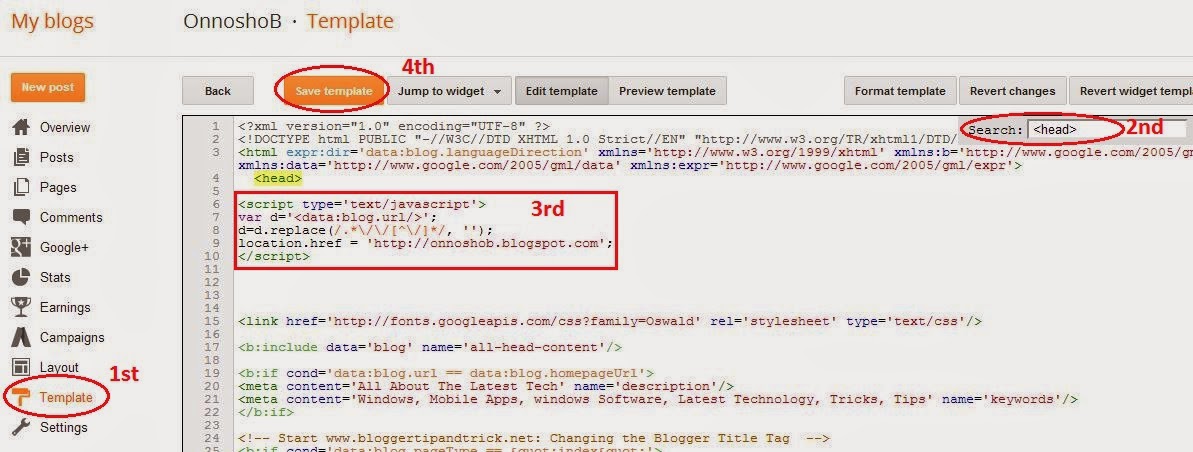
Many of us are using a free blog site. But when our free blog site gets too many popularity so that we need to buy domain and we have to do use re-direct option. Because if your free blog site is on blogspot and main site create a Wordpress, so that the blog could be redirected. These rules must be abided by to add broken links or to add 404 error pages to the main site and we facing many problems for that. Today I will show you very simple Method of trouble to solve. I'll show it on blogspot that's why you can use the same method to all of this. Follower of a better method below: 


         ( N.B.: Keep your site 's template backup Each time when you edit HTML of your site template)

1. The first in your Blogger Login

2. Then go dashboard then press on Template tab, then press on edit HTML tab.

3. Now you can see the template code and press CTRL+F on the Board & Search  this code.

4. Now copy the following code to paste after below code:

Code Download Click here

                                    If not understood Please see the image below: 

***Now enter your site name instead of http://onnoshob.blogspot.com/ and press on save template.

Done. 

I hope you would be done very easily, and if there is any problem you can give comments below, I'll try to answer of questions about problems as possible.


9 Jul 2014

Blue Screen-(0 ×00000007-6-E) of all the problems and solutions (If not seen post fall in problem of your PC!!!)


Hello everyone and welcome to my post. Today we will discuss the BLUE SCREEN-(0×00000007-6-E) with problems and solutions.

Hopefully your computer is faced blue Screen. But the question why this is Happened, Is It not too harmful….. Etc. I see the various problems in every case in there. So it's will very important post for your PC. **A special survey** When You get the BLUE SCREEN on your PC it's happening to your PC restart, The PC is not damaged due to problems, but it's saved from being serious damage. If you edit 0x00000007-6-e registry for off blue screen, then blue screen do not come, but the limitless load can be damaging to your PC.

But you have to know why it has appeared. And what due the Blue Screen comes and this post about this problem fix.

You get to see the BLUE SCREEN event (e.g. = 0 × 00000007, 0 x0000004E etc.), to find the cause of the problem and press on side-Link. 

After press the link you can learn from msdn.microsoft.com of the BLUE SCREEN problem causes and to learn more about prevention. I hope you solved your BLUE SCREEN problem By means of this link.

    CODE                        LINK

0×00000001        apc_index_mismach
0×00000002        queue_device_not_busy

0×00000003        invalid_affinity

0×00000004        invalid_data_access

0×00000005        invalid_process_attach_attpt

0×00000006        invalid_process_detach_attpt

0×00000007        invalid_software_intept

0×00000008        irql_dispatch_not_level

0×00000009        irql_not_greater_or_equal

0x0000000a         irql_not_less_or_equal
0x0000000b        no_exception_handling_support
0x0000000c         maximum_wait_objects_exceeded
0x0000000d        mutex_level_number_violation
0x0000000e        no_user_mode_context
0x0000000f         spin_lock_already_owned
0×00000010        spin_lock_not_owned
0×00000011        thread_not_mutex_owner
0×00000012        trap_cause_unknown
0×00000013        empty_thread_reaper_list
0×00000014        create_delete_lock_not_locked
0×00000015        last_chance_called_from_kmode
0×00000016        cid_handle_creation
0×00000017        cid_handle_deletion
0×00000018        reference_by_pointer
0×00000019        bad_pool_header
0x0000001a         memory_managementt
0x0000001b         pfn_share_count
0x0000001c         pfn_reference_count
0x0000001d        no_spin_lock_available
0x0000001e        kmode_exception_not_handled
0x0000001f         shared_resource_conv_error
0×00000020        kernel_apc_pending_during_exit
0×00000021        quota_underflow
0×00000022        file_system
0×00000023        fat_file_system
0×00000024        ntfs_file_system
0×00000025        npfs_file_system
0×00000026        cdfs_file_system
0×00000027        rdr_file_system
0×00000028        corrupt_access_token
0×00000029        security_system
0x0000002a         inconsistent_irp
0x0000002b        panic_stack_switch
0x0000002c        port_driver_internal
0x0000002d        scsi_disk_driver_internal
0x0000002e        data_bus_error
0x0000002f         instruction_bus_error
0×00000030        set_of_invalid_context
0×00000031        phase0_initialization_failed
0×00000032        phase1_initialization_failed
0×00000033        unexpected_initialization_call
0×00000034        cache_manager
0×00000035        no_more_irp_stack_locations
0×00000036        device_reference_count_not_zero
0×00000037        floppy_internal_error
0×00000038        serial_driver_internal
0×00000039        system_exit_owned_mutex
0x0000003a         system_unwind_previous_user
0x0000003b        system_service_exception
0x0000003c         interrupt_unwind_attempted
0x0000003d        interrupt_exception_not_handled
0x0000003f         no_more_system_ptes
0×00000040        target_mdl_too_small
0×00000041        must_succeed_pool_empty
0×00000042        atdisk_driver_internal
0×00000043        no_such_partition
0×00000044        multiple_irp_complete_requests
0×00000045        insufficient_system_map_regs
0×00000046        deref_unknown_logon_session
0×00000047        ref_unknown_logon_session
0×00000048        cancel_state_in_completed_irp
0×00000049        page_fault_with_interrupts_off
0x0000004a         irql_gt_zero_at_system_service
0x0000004b        streams_internal_error
0x0000004c        fatal_unhandled_hard_error
0x0000004d        no_pages_available
0x0000004e        pfn_list_corrupt
0x0000004f         ndis_internal_error
0×00000050        page_fault_in_nonpaged_area
0×00000051        registry_error
0×00000052        mailslot_file_system
0×00000053        no_boot_device
0×00000054        lm_server_internal_error
0×00000055        data_coherency_exception
0×00000056        instruction_coherency_exception
0×00000057        xns_internal_error
0×00000058        ftdisk_internal_error
0×00000059        pinball_file_system
0x0000005a        critical_service_failed
0x0000005b        set_env_var_failed
0x0000005c         hal_initialization_failed
0x0000005d        unsupported_processor
0x0000005e        object_initialization_failed
0x0000005f         security_initialization_failed
0×00000060        process_initialization_failed
0×00000061        hal1_initialization_failed
0×00000062        object1_initialization_failed
0×00000063        security1_initialization_failed
0×00000064        symbolic_initialization_failed
0×00000065       memory1_initialization_failed
0×00000066       cache_initialization_failed
0×00000067       config_initialization_failed
0×00000068       file_initialization_failed
0×00000069       io1_initialization_failed
0x0000006a        lpc_initialization_failed
0x0000006b        process1_initialization_failed
0x0000006c        refmon_initialization_failed
0x0000006d       session1_initialization_failed
0x0000006e       session2_initialization_failed
0x0000006f        session3_initialization_failed
0×00000070       session4_initialization_failed
0×00000071       session5_initialization_failed
0×00000072       assign_drive_letters_failed
0×00000073       config_list_failed
0×00000074       bad_system_config_info
0×00000075       cannot_write_configuration
0×00000076       process_has_locked_pages
0×00000077       kernel_stack_inpage_error
0×00000078       phase0_exception
0×00000079       mismatched_hal
0x0000007a        kernel_data_inpage_error
0x0000007b        inaccessible_boot_device
0x0000007c        bugcode_ndis_driver
0x0000007d       install_more_memory
0×00000112     msrpc_state_violation
0×00000113     video_dxg nl_fatal_error
0×00000115     agp_internal
0×00000116     video_tdr_err0
0×00000117     video__timeout_detected
0×00000119     video_schler nternal_error
0x0000011a      em_initia_failure
0x0000011d      event_tracing_fatal_error
0×00000121      driver_violation
0×00000122      whea_inteal_error
0×00000124      wheal ncorrectable_error
0×00000127      page_not_0
0x0000012b       faulty_hard ware_corrut_pag
0x0000012c       exfat_file_sys
0×00000133      dpc_watch dog_violat
0×00000138      gpio_controller_dri_error
0×00000139      kernel_security_failure
0×00000144      bagcode_usb3_driver
0x0000014b       soc_subsys_failure
0x1000007f        unexpected_kernel_mode_trap_m
0x100000ea       thread_stuck_in_device_driver_
0xc0000218       s_cannot_load_registry_file
0xc000021a       _system_process_terminated
0xc0000221       image_checksum_mismatch
0xdeaddead        manually_initi_crash1 

I hope you solved your BLUE SCREEN problem By means of this link.

                      **You stay in Happy & stay healthy**


Live MeccaLive Blogger Tricks